Published: · Updated: · by kodewright
Password Security Best Practices: The 2026 Playbook
Password security best practices in the order I'd set them up: unique random passwords, a manager, phishing-resistant 2FA, and the rules developers should drop.
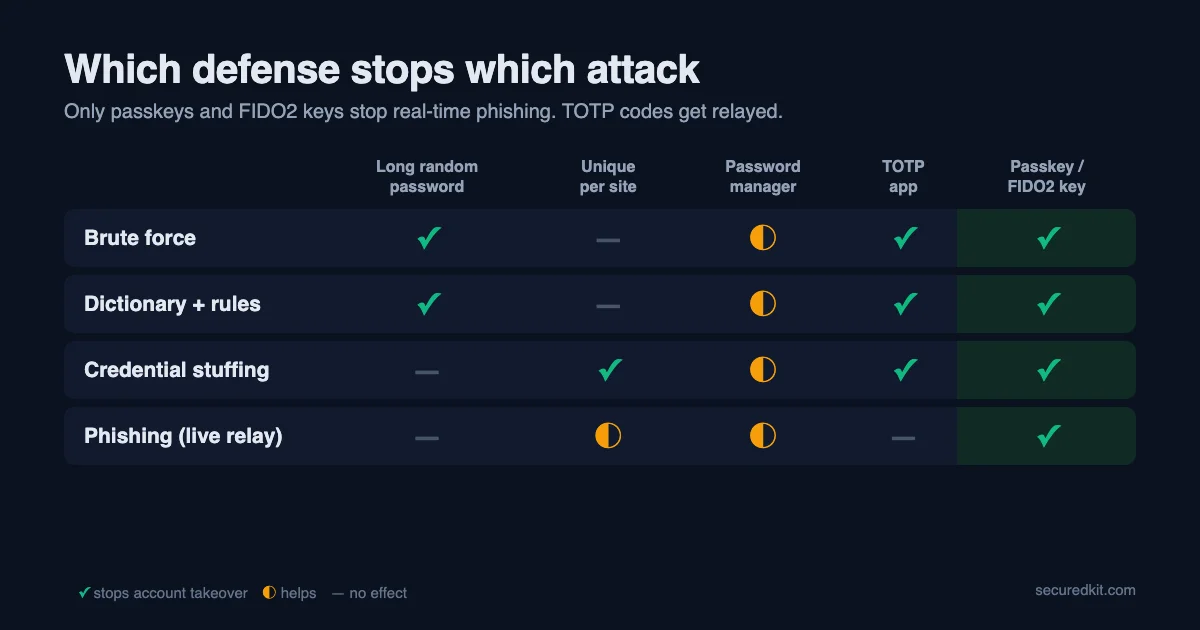
Password security best practices fit on one line: a random, unique password for every account, kept in a password manager, with a phishing-resistant second factor on the accounts that matter. Everything else on this page is detail on how to set that up, plus a section for developers on the password rules I used to ship and why I'd write them differently today.
The order matters. Each step closes a gap the previous one leaves open, so if you only have twenty minutes, do the first three and stop.
Four attacks, four defenses
Most account takeovers come from one of four attacks, and each one is stopped by a different habit:
| Attack | How it works | What stops it |
|---|---|---|
| Brute force | Trying every combination against a stolen hash | Length and randomness |
| Dictionary and rules | Trying real passwords and their variations (Summer2026!) | Passwords nobody chose by hand |
| Credential stuffing | Replaying an email and password leaked from one site on hundreds of others | A different password everywhere |
| Phishing | A fake login page that collects what you type | A manager that won't autofill there, and passkeys or a hardware key |
Verizon's 2025 Data Breach Investigations Report found stolen credentials were the most common way in (22% of breaches), with phishing at 16%. The 2026 edition moved exploited software vulnerabilities into first place, but credentials and phishing are still near the top, and neither needs a fast GPU. That's why uniqueness and phishing resistance matter more than squeezing extra bits out of a password.
Step 1: let a generator choose the passwords
A password you invent follows your habits: a word you like, a capital at the start, a year and an exclamation mark at the end. Cracking tools are built from exactly those habits, so a "complex" human password falls far faster than its length suggests.
Use 16 or more random characters for anything stored in a manager. The Password Generator makes them with the browser's cryptographic random source, and the password is created in your tab without being sent anywhere. For the few things you have to type from memory (the manager itself, a laptop login), use a passphrase of 5 or 6 random words instead; passphrase vs password has the math.
For a phone or SIM PIN, skip birthdays and 1234-style patterns and take a random one from the PIN Generator.
Step 2: one password manager, everywhere
You can't remember a hundred random passwords, so something has to. A password manager stores them encrypted, fills them in on the right site, and flags reused or leaked ones.
I use two: the browser's built-in manager and Psono, an open-source manager you can host yourself. The browser option is better than most people assume; are browser password managers safe goes through where it falls short. Bitwarden and 1Password are the common dedicated picks.
The manager also works as a phishing check. It fills a password only on the exact domain it was saved for, so if it stays silent on a page that looks like your bank, check the address bar before you type anything.
The master password is the one secret you memorize. Make it a random passphrase of at least 6 words and don't use it anywhere else.
Step 3: a second factor that a fake page can't steal
A second factor means a stolen password alone isn't enough. They differ a lot in what they stop:
| Method | Stops a fake login page? | Stops SIM swap? | My take |
|---|---|---|---|
| Passkey or hardware key (FIDO2) | Yes | Yes | Use it wherever it's offered |
| Authenticator app (TOTP codes) | No, a live phishing page can relay the code | Yes | The sensible default |
| Push prompt on your phone | No, unless it asks you to match a number | Yes | Fine with number matching |
| SMS code | No | No | Better than nothing |
I use an authenticator app and phone prompts for most accounts. Passkeys are the bigger upgrade: the login is tied to the real domain, so a look-alike site has nothing to collect. The Passkey Checker tells you whether your browser and device support them, and 2FA vs MFA covers the differences between methods in more depth.
Turn the second factor on for email first, then the password manager, then banking.
Step 4: protect the email account like it's the master key
Every "forgot password" link goes to your inbox, so whoever controls your email can reset almost everything else. When I've helped people recover a hijacked account, the usual problem was that they didn't know the login details of their recovery email, and nothing had a second factor turned on.
For your main email account:
- Give it a unique generated password of 20 or more characters.
- Add a passkey or an authenticator app, and remove SMS as a sign-in option if the provider allows it.
- Print the backup codes and keep them somewhere physical.
- Check the recovery phone number and recovery address now, while you still have access.
A separate address (or forwarding aliases such as Apple's Hide My Email or SimpleLogin) for shopping and newsletters keeps your main address out of most breach dumps and phishing lists.
Step 5: assume a breach will happen and react fast
Breaches are routine, and companies sometimes take months to tell you. Check your addresses on Have I Been Pwned (haveibeenpwned.com), and turn on the breach alerts in your password manager. When a site you use is breached, change that one password. If it was unique, you're done; if you reused it, change it everywhere it was used. What to do in the first 48 hours after a leak has the full order of steps.
Don't rotate passwords on a schedule. Change them when there's a reason.
Step 6: keep the device clean
A keylogger or a malicious browser extension reads your password as you type it, so strength doesn't help there. Turn on automatic updates for the OS and the browser, remove extensions you don't use, and install software only from the vendor's own site or app store.
For developers: the password rules I shipped, and what I'd change
In products I've built, I used the classic rule set: a minimum length plus at least one uppercase letter, one digit and one symbol. I never checked new passwords against a breach list. That's the rule set most frameworks and tutorials still show, and NIST SP 800-63B Rev. 4 now says to drop it. Its verifier section says verifiers "SHALL NOT impose other composition rules", requires a minimum of 15 characters when the password is the only factor (8 when it's used with MFA), says the maximum should be at least 64, bans scheduled rotation, and requires checking new passwords against a blocklist of common, expected and compromised ones.
To see what the old rules actually let through, I ran a few passwords through two validators in Node 22: the classic rule (8+ characters, uppercase, digit, symbol) and a NIST-style one (15+ characters, no composition rules, a blocklist lookup on the whole password). The last column is what my own Password Strength Checker reports, using the same charset × length formula as the tool:
const sym = /[!@#$%^&*()\-_=+[\]{}|;:,.<>?]/
const classic = p => p.length >= 8 && /[A-Z]/.test(p) && /[0-9]/.test(p) && sym.test(p)
const nist = (p, blocklist) =>
  [...p.normalize('NFC')].length >= 15 && !blocklist.has(p.toLowerCase())
| Password | Classic rule | NIST-style rule | Strength Checker |
|---|---|---|---|
Password1! | Pass | Fail (too short, blocklisted) | 64.9 bits, "Strong" |
P@ssw0rd | Pass | Fail | 51.9 bits, "Fair" |
Summer2026! | Pass | Fail | 71.4 bits, "Strong" |
umbrella-oyster-tundra-lamp | Fail (no uppercase or digit) | Pass | 155.4 bits, "Very Strong" |
kX9#vT2!mQ4$wL7z (generated) | Pass | Pass | 103.9 bits, "Strong" |
The classic rule accepts three passwords that are a word plus the required characters bolted on, and rejects the four-word passphrase. The checker row is an honest limit of my own tool: it measures the character set and the length, so it has no idea that Password1! is built the way every cracking rule file builds candidates. That's why the blocklist is the part of NIST's guidance I'd add first.
Length beats composition even for random passwords. With one RTX 4090 running hashcat 6.2.6 against unsalted MD5 (164.1 GH/s), the average time to find a password, assuming it was generated at random:
| Random password | Keyspace | MD5, one RTX 4090 | bcrypt cost 10, one RTX 4090 |
|---|---|---|---|
| 8 characters, full printable ASCII (95) | 6.6 × 10¹⁵ | ~5.6 hours | ~18,000 years |
| 15 characters, lowercase only (26) | 1.7 × 10²¹ | ~162 years | ~4.6 billion years |
Fifteen lowercase letters give 250,000 times the keyspace of eight characters drawn from all of ASCII. Human-chosen passwords don't get anywhere near these numbers, because dictionary and rule attacks skip most of the keyspace. The bcrypt column (about 5,750 guesses per second, derived from the cost-5 benchmark) shows the other half of the job: storing passwords with a slow, salted hash. Salting and hashing covers the storage side, and the Password Policy Builder exports a length-first rule set as JSON or a regex.
If I were writing the signup check today:
- Require 15 characters (or 8 if MFA is mandatory), allow at least 64, and accept spaces and Unicode, counting code points after NFC normalization.
- Drop the uppercase, digit and symbol requirements.
- Reject passwords found in a breach corpus. The Pwned Passwords range API does this with k-anonymity: you send the first 5 hex characters of the SHA-1 hash, get back every suffix with that prefix and a count, and compare locally, so the password never leaves your server.
- Never force a change on a timer; force one when there's evidence the password leaked.
Where to start today
If you do one thing, open your email account settings, replace the password with a generated one, and add a passkey or an authenticator app. Then move every other login into a password manager as you next sign in to it, and the reused passwords disappear over a few weeks without a big cleanup session.
FAQ
How often should I change my passwords?
Only when there's a reason: the site was breached, you reused the password somewhere, or you typed it into a page you no longer trust. NIST SP 800-63B Rev. 4 forbids forcing scheduled changes, because people respond with Password1, Password2, Password3.
Is a long passphrase better than a short complex password?
Yes, if the words are picked at random. Six words from the EFF list give about 77.5 bits, more than a random 10-character password with symbols (about 65.7 bits). A phrase you made up yourself, like a song lyric, is much weaker than its length suggests.