Published: · Updated: · by kodewright
2FA vs MFA: Which One Do You Really Need?
2FA is MFA with exactly two factors. What matters more is which second factor you pick: what SMS, TOTP, push and passkeys each stop, with NIST Rev. 4 rules.
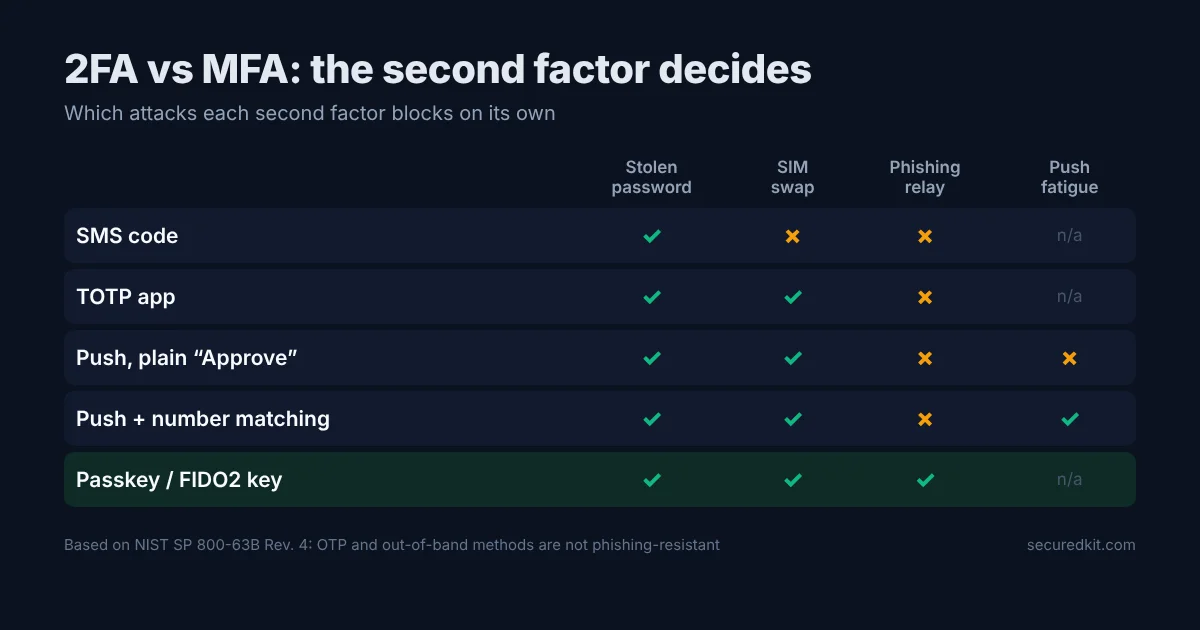
2FA vs MFA comes down to a count: two-factor authentication uses exactly two different kinds of factor, and multi-factor authentication uses two or more. So every 2FA setup is MFA, and in practice nearly all consumer "MFA" is 2FA. For a personal account you don't need a third factor. You need the right second one, because SMS, an authenticator app, a push prompt and a passkey stop very different attacks.
The three factor types, and what doesn't count as two
NIST SP 800-63B groups authenticators into three kinds: something you know (a password or PIN), something you have (a phone, a security key, a device holding a private key), and something you are (a fingerprint or face). Two factors only count as two when they come from different kinds.
A password plus a security question is still single-factor: both are things you know, and both get phished or leaked together. NIST also allows a biometric only as part of multi-factor authentication tied to a physical device, never on its own, because a biometric isn't a secret and can't be revoked once it's been copied.
2FA vs MFA side by side
| 2FA | MFA | |
|---|---|---|
| Number of factors | Exactly 2 | 2 or more |
| Relationship | One case of MFA | Includes 2FA |
| Typical place | Consumer accounts: email, banking, social | Enterprise and government access: smart card + PIN, device certificate + password + app |
| Phishing-resistant? | Depends on the second factor | Depends on the factors, not their number |
The last row is the one that matters. A third factor that can be phished the same way as the first two adds friction and very little protection. NIST's own rules reflect this: for AAL2 (the level most logins with a second factor reach) Rev. 4 says verifiers shall offer at least one phishing-resistant option, and AAL3 requires one. Neither level asks for a factor count above two.
Which second factor stops which attack
This is the comparison I'd want before choosing, so I built it from how each method actually works and from NIST Rev. 4's classification. ✓ means the method blocks the attack on its own; ✗ means it doesn't.
| Second factor | Stolen or reused password | SIM swap | Real-time phishing relay | Push fatigue |
|---|---|---|---|---|
| SMS code | ✓ | ✗ | ✗ | n/a |
| Email code | ✓ (unless the mailbox is also taken) | ✓ | ✗ | n/a |
| TOTP app (RFC 6238) | ✓ | ✓ | ✗ | n/a |
| Push prompt, plain "Approve" | ✓ | ✓ | ✗ | ✗ |
| Push with number matching | ✓ | ✓ | ✗ | ✓ |
| Passkey or FIDO2 security key | ✓ | ✓ | ✓ | n/a |
Every method stops the most common attack, a password bought from a breach dump or reused from another site. That alone justifies turning 2FA on everywhere. The columns to the right are where they split.
SMS is the only method that fails to a SIM swap, where someone talks or bribes a carrier into moving your number to their SIM, and then receives your codes. NIST Rev. 4 lists phone-number delivery as a restricted authenticator: verifiers that use it have to offer an alternative and weigh risk signals such as a recent number port. X took SMS 2FA away from non-paying accounts in March 2023, which pushed a lot of people onto authenticator apps without them asking for it. This one isn't theoretical for me: I've seen SIM-swap or SMS-code phishing attempts first-hand or through people I know.
Email codes are fine against a SIM swap, but NIST Rev. 4 says email shall not be used for out-of-band authentication at all, and the reason is in the first column: if your mailbox falls, both factors fall with it.
TOTP codes come from a shared secret and the current 30-second window, so there's no carrier involved. They still fail to a phishing proxy (Evilginx-style kits) that shows you the real site's login form, passes your password and code through in real time, and keeps the session cookie. One less obvious weakness: the server has to store your TOTP secret in a form it can use, so a database leak exposes the second factor too. A passkey server stores only a public key. If you want to see the HMAC that sits under every TOTP code, the Hash Generator has an HMAC mode.
Push prompts and fatigue attacks
I use phone push notifications on some accounts and an authenticator app on others. Push is the easiest to live with, and that ease is also its weak point. In the September 2022 Uber breach, the attacker had a contractor's password (Uber said it was likely bought on the dark web), sent push prompts until the contractor approved one, and messaged him on WhatsApp posing as Uber IT to say that approving would make them stop.
Number matching is the fix: the login screen shows a number and you type it into the phone, so a prompt you didn't start can't be approved by reflex. Microsoft made it mandatory for Authenticator push on May 8, 2023. If your push app offers it, turn it on. If a prompt arrives that you didn't trigger, deny it and change the password, because a prompt means the password already works for someone else.
Passkeys: two factors in one step
A passkey is a WebAuthn credential: a private key on your device, released after a fingerprint, face or PIN check. That's something you have plus something you are or know, so a passkey on its own is two-factor. It's also the only consumer method in the table above that stops a relay. The browser binds the signature to the site's real origin, so a lookalike domain gets nothing it can replay.
NIST Rev. 4 accepts synced passkeys (the ones Apple, Google and password managers copy across your devices) at AAL2. AAL3 needs a key that can't be exported, which in practice means a hardware security key. Adoption is past the early stage: in October 2025 the FIDO Alliance reported over 3 billion passkeys securing consumer accounts.
Before relying on one, check what your own setup supports. The Passkey Checker reports which WebAuthn features your browser and device offer, and it runs locally in the browser without sending anything to a server.
What I'd set up, account by account
| Account | Setup | Fallback |
|---|---|---|
| Primary email | Passkey or security key | TOTP app, recovery codes printed or in the manager |
| Password manager | Passkey or security key where supported | TOTP app; the master password itself is the first factor |
| GitHub, cloud consoles, domain registrar | Security key or passkey | TOTP app |
| Banking | Whatever the bank offers in its app | Ask the bank to drop SMS fallback if it can |
| Social accounts | TOTP app or passkey | Recovery codes |
| Accounts where only SMS is offered | SMS | Add a carrier PIN or port-out lock if your carrier has one |
Two rules hold across the table. First, your account is only as strong as its weakest enabled method: if SMS stays on as a fallback, an attacker will pick "send me a code instead". Second, save the recovery codes when you enable anything, because a lost phone with no codes turns into a support ticket or a lost account. When I've helped people get back into accounts, the usual problem was that they didn't know the login details of their own recovery email.
The password still matters even with a strong second factor, because once it's known, you're down to one factor. Generate a unique one per site with the Password Generator so a breach somewhere else hands nobody a working first factor. For step-by-step settings on the two accounts most worth protecting, see how to secure your Google account and Apple ID, and if a password has already leaked, start with what to do in the first 48 hours after a breach.
FAQ
Is SMS 2FA safe in 2026?
It's better than a password alone, but it's the weakest second factor: it fails to SIM swaps and to phishing pages that relay the code. NIST SP 800-63B Rev. 4 lists phone-number delivery as a restricted method. Use it only where nothing else is offered.
Is a passkey 2FA?
Yes, when the device asks for a fingerprint, face or PIN before using it. That combines something you have (the device holding the private key) with something you are or know. NIST accepts synced passkeys at AAL2 but not at AAL3, which requires a non-exportable key such as a hardware security key.