Published: 2026-05-12
Salting and Hashing: A Developer's Practical Guide (2026)
Learn how password hashing and salting actually work — with GPU benchmarks, algorithm comparisons, and code examples. The definitive guide for backend devs.
If your database gets dumped tonight — and statistically, it will eventually — the question isn't whether attackers get your users' password hashes. They will. The question is whether those hashes are crackable before your users can rotate their credentials.
That answer comes down to one decision you made (or didn't make) when you wrote your user registration endpoint: which hashing algorithm did you use, and did you salt it correctly?
What Password Hashing Actually Is
A cryptographic hash function takes arbitrary input and produces a fixed-length output (the digest). It's deterministic — same input always produces same output — and one-way: you can't reverse it. MD5 produces 128-bit digests. SHA-256 produces 256-bit digests. Neither is suitable for passwords. Not because they're broken as hash functions, but because they're too fast.
Speed is the enemy here. A hash designed for checksums or digital signatures should complete in microseconds. A hash protecting a user's password needs to take tens or hundreds of milliseconds — deliberately, by design. The difference between "fast" and "slow" hashing is the difference between a breach that costs you a PR crisis and one that costs your users their bank accounts.
Why Salts Exist (And What They Actually Prevent)
Before salting, attackers pre-computed massive lookup tables mapping common passwords to their MD5/SHA-1 digests — rainbow tables. You could crack password123's MD5 hash instantly with a table lookup. No GPU required.
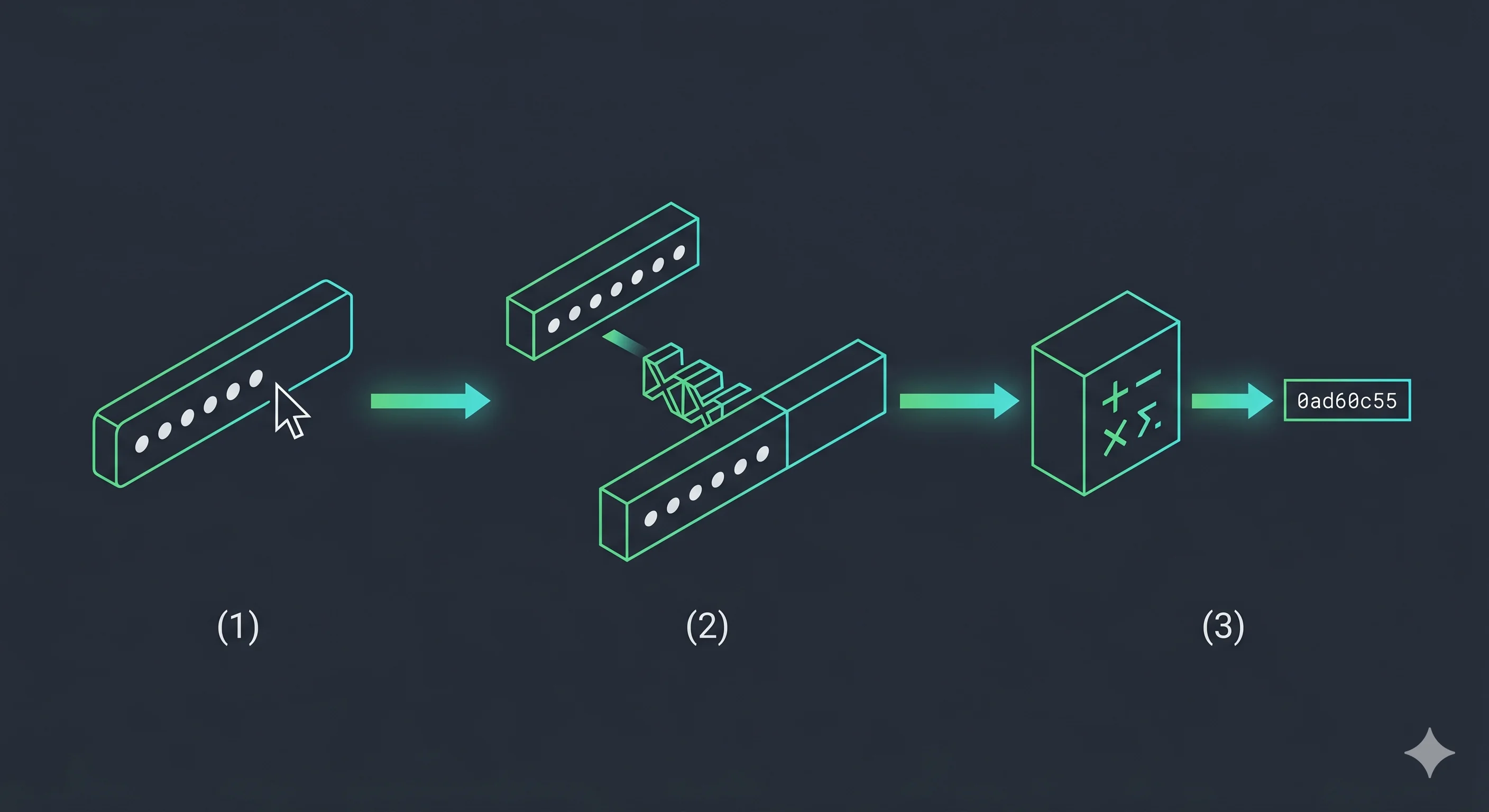
A salt is a random byte string generated uniquely per user, prepended to the password before hashing:
hash = H(salt || password)
The salt is stored in plaintext alongside the hash. That's intentional. Its job isn't to be secret — it's to make rainbow tables computationally useless. With a 16-byte random salt, an attacker would need a separate rainbow table for every possible salt value. That's 2^128 tables. Not happening.
What salting doesn't prevent: It doesn't stop an attacker from brute-forcing your hashes one at a time. That's where algorithm choice matters.
The Algorithm Hierarchy
Not all hashing algorithms are created equal. Here's where each one lands in 2026:
| Algorithm | Type | RTX 4090 Speed | Suitable for Passwords? | Notes |
|---|---|---|---|---|
| MD5 | General-purpose | ~164 billion/sec | No | Cryptographically broken; collision attacks exist |
| SHA-1 | General-purpose | ~91 billion/sec | No | Collision-broken by SHAttered (2017) |
| SHA-256 | General-purpose | ~23 billion/sec | No | Secure as a hash; catastrophic for passwords |
| SHA-512 | General-purpose | ~9 billion/sec | No | Still 9 billion guesses/sec is not "slow enough" |
| bcrypt | KDF | ~184,000/sec | Yes | Cost factor tunable; 60+ year default; widely supported |
| scrypt | KDF | ~100,000/sec | Yes | Memory-hard; stronger than bcrypt against ASICs |
| Argon2id | KDF | ~15,000/sec | Yes (preferred) | NIST SP 800-63B recommended; memory + time hard |
The takeaway is blunt: if you're using any SHA variant to hash passwords, you have a critical vulnerability. Fix it before you finish reading this.
The Math: Why RTX 4090 Benchmarks Define Your Minimum Work Factor
The entropy formula for passwords is:
$H = L \times \log_2(R)$
Where H = entropy in bits, L = password length, R = character pool size (charset).
A 12-character password using full ASCII (95 printable chars) gives H = 12 × log₂(95) ≈ 78.8 bits of entropy. That's the theoretical search space. The practical question is how quickly an attacker can traverse it.
Against bcrypt at cost factor 12 (~184,000 hashes/sec on RTX 4090):
| Password Entropy | bcrypt Time to Crack (RTX 4090) | SHA-256 Time to Crack (RTX 4090) |
|---|---|---|
| 40 bits (weak) | ~70 minutes | ~0.05 seconds |
| 60 bits (fair) | ~200 years | ~14 hours |
| 78 bits (strong) | ~28 million years | ~188 years |
| 100 bits (very strong) | Effectively infinite | ~800,000 years |
Same password. Completely different outcomes. That's the algorithm choice made tangible.
H = L × log₂(R) — where L = 0 chars, R = ? charset pool
How bcrypt Works (And What the Cost Factor Means)
bcrypt was designed in 1999 by Niels Provos and David Mazières specifically for password hashing. It generates a random 128-bit salt internally, runs the Eksblowfish key schedule, and embeds both the salt and cost factor in its output string:
$2b$12$LQv3c1yqBWVHxkd0LHAkCOYz6TtxMQJqhN8/LeAi9O5p2mC...
Breaking that down: $2b$ is the algorithm version, 12 is the cost factor, and the rest is the base64-encoded salt + digest.
The cost factor is logarithmic. Cost 12 means 2^12 = 4,096 rounds of the Eksblowfish key setup. Bump it to 13 and you double the computation time. Bump it to 14 and you double it again. Your target should be a cost factor that takes ~100–300ms on your server hardware. Re-evaluate this every 18 months as hardware improves.
Current 2026 recommendations:
- bcrypt: cost factor 13–14
- Argon2id: memory=64MB, iterations=3, parallelism=4
- scrypt: N=32768, r=8, p=1
Why Argon2id Wins in 2026
Argon2id is the hybrid variant of Argon2 — it runs Argon2i (side-channel resistant) in the first half and Argon2d (GPU-resistant) in the second. The memory hardness is the key differentiator.
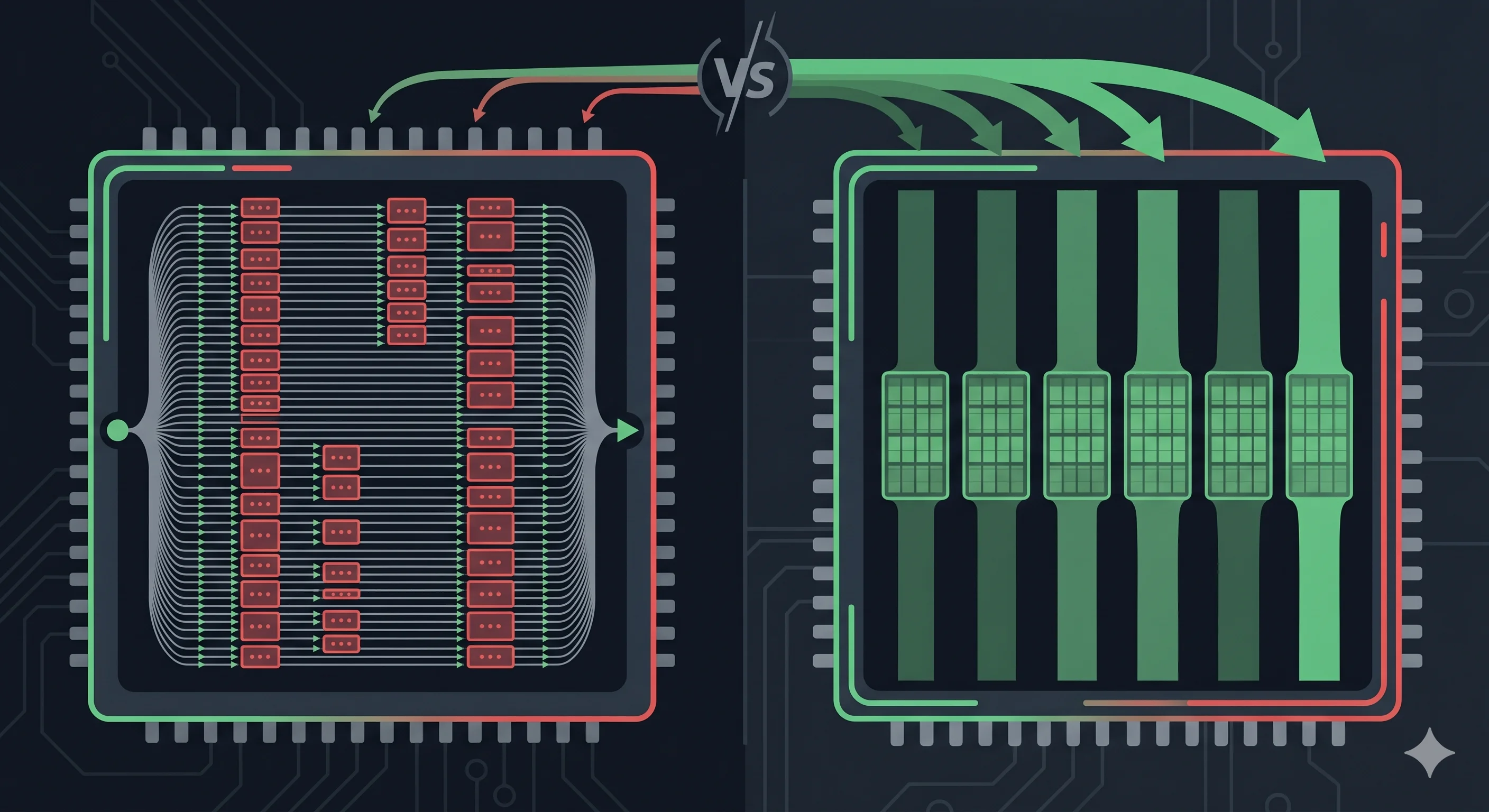
bcrypt's memory footprint is fixed at 4KB. An attacker can run thousands of bcrypt instances in parallel on a single GPU because each instance fits entirely in GPU cache. Argon2id with 64MB memory cost doesn't fit in GPU cache — it requires actual memory bandwidth, which GPUs don't have at the same ratio as CPUs. You're forcing the attacker onto hardware that's orders of magnitude less efficient for this specific task.
NIST SP 800-63B Section 5.1.1.2 explicitly recommends memory-hard KDFs for password storage. Argon2id satisfies that requirement. bcrypt does not, technically — but it's still far better than any general-purpose hash.
Use our Hash Generator — runs 100% in your browser, zero data sent to any server — to verify hash outputs and test HMAC signatures for your API authentication workflows.
Common Implementation Mistakes
Mistake 1: Using a global salt. Some devs generate one salt and use it for every user. This defeats salting entirely — two users with the same password get the same hash. Per-user, per-hash random salts only.
Mistake 2: Hashing before salting. H(password) + salt stored separately is not salted hashing. The salt must be input to the hash function: H(salt || password). Every KDF library handles this correctly if you use the library's built-in salt generation. Don't roll your own.
Mistake 3: Truncating bcrypt input. bcrypt silently truncates passwords longer than 72 bytes. If you're pre-hashing with SHA-256 to work around this, use bcrypt(base64(sha256(password))) — not raw SHA-256 bytes. Here's why base64 specifically: a raw SHA-256 digest is 32 bytes of arbitrary binary data, and any of those bytes could be 0x00. bcrypt's C-string internals treat null bytes as string terminators, so a password whose SHA-256 digest happens to start with a null byte would be hashed as an empty string. Base64-encoding the digest first eliminates null bytes entirely from the input. It's a subtle attack surface and the kind of thing that silently destroys your security without any error.
Mistake 4: Using Math.random() for salt generation. Math.random() is a deterministic PRNG seeded from system time. It's not cryptographically secure. Your salt generator needs crypto.getRandomValues() on the frontend or crypto.randomBytes() in Node.js — the same entropy source that your OS uses for TLS keys.
"Avoid tools that use
Math.random(). Our Password Generator uses the Web Crypto API (crypto.getRandomValues()), ensuring your entropy source is as secure as your operating system's kernel."
Mistake 5: Not re-hashing on login. If you're upgrading your algorithm (say, from bcrypt cost 10 to Argon2id), you can't re-hash stored passwords — you don't have the plaintexts. The correct approach: on successful login, check if the stored hash uses the old algorithm/parameters, and if so, re-hash with the new parameters and update the stored value. Gradual migration, zero disruption.
How to Implement Argon2id in Node.js
Copy-paste ready. The argon2 npm package wraps the reference C implementation:
import argon2 from "argon2";

// Hash on registration
const hash = await argon2.hash(password, {
  type: argon2.argon2id,
  memoryCost: 2 ** 16, // 64 MB
  timeCost: 3,         // iterations
  parallelism: 4,
});
// Store `hash` in your database — it embeds salt + params in the string

// Verify on login
const valid = await argon2.verify(hash, password);
if (!valid) throw new Error("Invalid credentials");

// Rehash check — upgrade parameters transparently on successful login
if (argon2.needsRehash(hash, { memoryCost: 2 ** 16, timeCost: 3 })) {
  const newHash = await argon2.hash(password, { type: argon2.argon2id, memoryCost: 2 ** 16, timeCost: 3 });
  await db.updateUserHash(userId, newHash);
}
The needsRehash call is your migration path. Next time you increase memoryCost, existing users get silently upgraded on their next successful login. No mass re-hash job, no downtime.
Verifying Hash Integrity in Practice
The Hash Generator on this site supports SHA-256, SHA-512, HMAC, and file hashing — all client-side. It's useful for verifying API payload signatures, testing HMAC-SHA256 outputs for webhook validation, and checking file checksums without uploading anything.
For password strength before it ever reaches your hash function, the Password Strength Checker calculates entropy bits and offline crack-time estimates against bcrypt and MD5 benchmarks. Run it on your test passwords before your next deploy.
🛡️ Security Checkpoint — Complete This Step
If your user table was dumped right now, your algorithm choice determines how much time your users have to respond. Check your stack before it's not hypothetical.
- → Hash Generator — verify your HMAC and SHA outputs client-side, no uploads
- → Password Strength Checker — see entropy bits and bcrypt crack-time estimates live
- → Password Generator — generate high-entropy passwords worth protecting with Argon2id
Frequently Asked Questions
What is the difference between hashing and salting?
Hashing is a one-way transformation — a deterministic function that converts any input into a fixed-length digest. Salting adds a unique random value (the salt) to each password before it's hashed. Without salts, two users with the password hunter2 produce identical hashes, enabling precomputed rainbow table lookups. With unique per-user salts, each hash is unique even for identical plaintext passwords. The salt is stored in plaintext alongside the hash — its job is computational cost, not secrecy.
Is SHA-256 safe for password hashing?
No, and the reason is pure arithmetic. SHA-256 is designed to be fast — it's used for digital signatures, TLS handshakes, and blockchain proofs, where speed matters. An RTX 4090 computes approximately 23 billion SHA-256 hashes per second. A 10-character password using uppercase, lowercase, and digits (62 chars) has a search space of 62^10 ≈ 8.4 × 10^17. At 23 billion hashes/sec, that's about 37 million seconds — roughly 14 months. With a GPU cluster? Days. Use Argon2id.
What is Argon2id and why is it the 2026 recommendation?
Argon2id won the Password Hashing Competition in 2015 and is now recommended by NIST SP 800-63B for all new password storage implementations. Unlike bcrypt (4KB memory footprint) and scrypt, Argon2id's configurable memory parameter — typically 64MB or higher — makes it memory-hard. GPUs excel at parallel computation but have limited memory bandwidth per core. Memory-hard algorithms exploit this weakness: an attacker running Argon2id on a GPU sees dramatically lower throughput than an equivalent CPU, reducing the attacker's cost advantage. At 64MB/64-thread configuration, expect ~15,000 hashes/sec on an RTX 4090 — vs 23 billion for SHA-256.
Should I use bcrypt or Argon2id for a new project in 2026?
If you're starting fresh: Argon2id. It has stronger theoretical guarantees, is memory-hard, and is NIST-recommended. The main reason to choose bcrypt is ecosystem maturity — it's been battle-tested for 25+ years and is available in every language's standard security library. If your stack's Argon2id bindings are immature or not actively maintained, bcrypt at cost 13+ is the pragmatic safe choice. Scrypt occupies a reasonable middle ground but has fewer audited implementations.
What cost factor should I use for bcrypt in 2026?
Target a cost factor where hashing takes 100–300ms on your production server hardware. On modern cloud instances (equivalent to ~4-8 vCPUs), bcrypt cost 13 typically lands in that range. Test it. As hardware improves, bump the cost factor and use login-time rehashing to migrate existing hashes transparently. Never hard-code a cost factor without a mechanism to increase it — that's technical debt with a security expiration date.
What is a pepper and do I need one?
A pepper is a secret value — typically a 32-byte random string — stored outside your database, usually in an environment variable or a secrets manager like Vault or AWS Secrets Manager. Before hashing, you append (or HMAC) the pepper with the password:
hash = Argon2id(password || pepper)
Unlike a salt, the pepper is the same for all users and is never stored in the database. Its threat model is specific: it protects against a database-only breach. If an attacker steals your user table but not your server config, they have a pile of Argon2id hashes they cannot crack — because they're missing the pepper that was input to every single one of them.
Do you need it? If your password hashes and your server secrets live in completely separate systems with separate access controls, yes — it adds a meaningful independent layer. If your database and your env vars are compromised together (a full server breach), a pepper provides no additional protection. It's not a substitute for a strong KDF, but used alongside Argon2id it's a low-cost, high-value defense-in-depth measure. NIST SP 800-132 calls this a "secret value added to the password before processing."