Published: · by kodewright
Base64 Image SEO: When Data URIs Help and When They Hurt
Inlining images as Base64 data URIs rarely speeds up a page. Measured overhead, caching and LCP costs, and the small cases where inlining does pay off.
Inlining images as Base64 data URIs is almost never a page speed win in 2026. It makes sense for icons under a few kilobytes and for blurred placeholders. A hero image, a product photo or anything you want ranking in Google Images should stay a normal file with its own URL. The "fewer HTTP requests" argument for inlining was built for HTTP/1.1, and HTTP/2 multiplexing removed most of the cost it was fighting.
This doesn't explain what Base64 is (the encoding vs encryption guide covers that). It's about what inlining does to bytes, caching and Core Web Vitals, measured, so you can decide per asset.
What a data URI actually is
A data URI puts the file's bytes into the URL itself. The syntax, per MDN:
data:[<media-type>][;base64],<data>

<img src="data:image/webp;base64,UklGRj4+AABXRUJQVlA4IDI+AAC..." alt="...">
The browser decodes the string and paints it without a network request. That is the only advantage. All the trade-offs come from the fact that the image now lives inside another file.
The 33% overhead mostly disappears with gzip
Base64 maps 3 bytes to 4 ASCII characters (RFC 4648), so the raw string is about a third bigger. Most guides stop there. But you never send the raw string: it sits inside HTML or CSS, and your server compresses those. I measured a real 1200×630 WebP hero from this blog and a 24px lock icon SVG on macOS:
base64 -i hero.webp | tr -d '\n' | wc -c            # Base64 size
base64 -i hero.webp | tr -d '\n' | gzip -9c | wc -c # what actually goes over the wire
| Asset | Original | Base64 | Original, gzip -9 | Base64, gzip -9 |
|---|---|---|---|---|
| hero.webp (1200×630) | 32,436 B | 43,248 B (+33%) | 32,474 B | 32,765 B (+1%) |
| icon.svg (24×24) | 269 B | 360 B (+34%) | 207 B | 289 B (+40%) |
Gzip claws back almost all of the Base64 overhead on already-compressed binary formats, so over the wire the hero costs roughly 1% more. If the transfer size were the whole story, inlining that hero would be nearly free.
The SVG goes the other way. SVG is text that compresses well on its own, and Base64 scrambles the repetition gzip relies on, so the inlined version stays 40% heavier after compression. That's why SVGs should be URL-encoded rather than Base64-encoded (more on that below).
Where inlining actually costs you
Caching is gone
A file at /images/logo.webp is downloaded once and served from cache on every later page view. A data URI is cached only as part of the file that contains it. If that's your HTML, and SSR HTML is usually sent with no-cache or a short max-age, the image is re-downloaded on every page view. Inline a 4 KB logo into the layout, and a visitor who views 6 pages downloads it 6 times: 24 KB instead of 4 KB.
Inlining into an external CSS file is less bad, because the stylesheet is cached. But then any change to the image invalidates the whole stylesheet, and every user re-downloads all your CSS for a one-icon tweak.
Render-blocking bytes
CSS blocks rendering. Every kilobyte of Base64 you put in a stylesheet is a kilobyte the browser must download and parse before it paints anything, including the text that is usually your LCP element. A normal <img> is fetched in parallel by the preload scanner and doesn't hold up first paint.
The same applies to the HTML: inlined images push everything after them further down the byte stream. A 40 KB data URI in the <head> (from a misconfigured page builder or a framework inlining an OG image) delays every byte of content that follows.
LCP gets harder, not easier
If the LCP element is the inlined image, it can't paint before the HTML containing it has arrived and been parsed. It also can't take fetchpriority="high" or a <link rel="preload"> head start, and loading="lazy" saves nothing, because the bytes are already in the document. A normal image with fetchpriority="high" usually wins on a real connection: the text paints as soon as the HTML and CSS arrive, while the preload scanner fetches the hero in parallel.
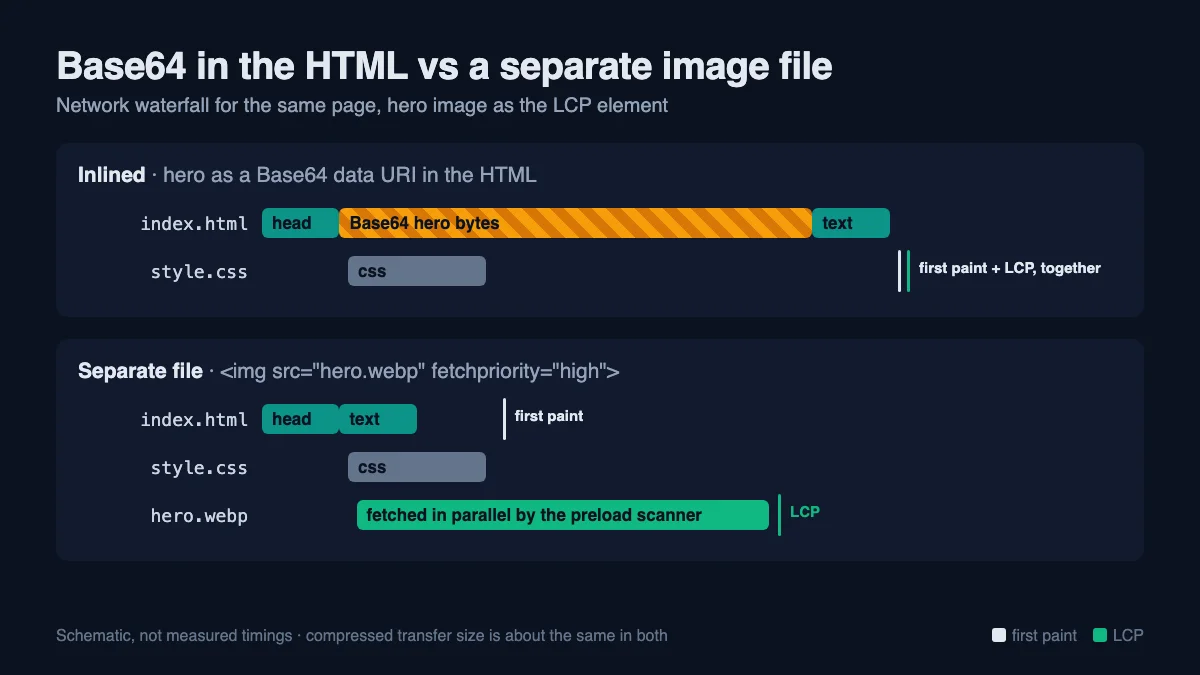
Google's threshold for a "good" LCP is 2.5 seconds at the 75th percentile. Check against your own field data before believing any rule of thumb, including mine.
It's invisible to image search signals
Google's image SEO docs do say you can inline images as data URIs in <img src>, and add that inlining "can considerably increase the size of the page". The same page states that Google doesn't index CSS images, so a background-image: url(data:...) is invisible to Image search either way. My own view on <img> data URIs: an image with no stable URL can't be linked to, hotlinked, shared or referenced in an image sitemap, so it builds no signals of its own. For a photo you want to rank, that is reason enough to keep it as a file.
There's also a hard size limit. Googlebot processes only the first 2 MB of an HTML file. A few large inlined images in a long page can push the actual content past that cut-off.
Where inlining does pay off
| Asset | Inline? | Why |
|---|---|---|
| UI icons under ~1–2 KB used in CSS | Yes, URL-encoded SVG | Saves a request for something tiny; text compresses well |
| Blurred LQIP placeholder (~20×12 px) | Yes, Base64 | Shows something while the real image loads; small enough not to matter |
| Single-use email signature or HTML email images | Sometimes | Some clients block remote images; others block data URIs. Test your targets |
| Logo in a site-wide layout | No | Re-sent on every page view; cache it instead |
| Hero / LCP image | No | Use a file with fetchpriority="high" |
| Product or article photos | No | Need a stable URL for Image search |
| Anything over 4 KB | No | Caching and render-blocking costs outweigh the saved request |
A note on placeholders: since Chrome 112, images with less than 0.05 bits of image data per displayed pixel are ignored as LCP candidates. A tiny blurred Base64 placeholder stretched to full width falls below that, so it won't "fake" a fast LCP. The real image still has to arrive. The placeholder improves perceived loading; it won't move your metric.
Encode SVGs as URLs, not Base64
For SVG, skip Base64 entirely and percent-encode the markup:
.icon-lock {
  background-image: url("data:image/svg+xml,%3Csvg xmlns='http://www.w3.org/2000/svg' viewBox='0 0 24 24' fill='none' stroke='%2310b981' stroke-width='2'%3E...%3C/svg%3E");
}
The rules that matter: swap double quotes for single quotes inside the SVG so they don't close the CSS string, encode < and > as %3C and %3E, and always encode # as %23. An unencoded # in a hex color starts a URL fragment, and the browser drops everything after it, a classic reason an inline SVG silently renders as nothing. On the lock icon above, the URL-encoded form was 286 bytes, 204 gzipped, against 289 gzipped for Base64.
You can do this by hand in the URL Encoder, which is safer than a random online converter if the SVG is unreleased brand artwork: it runs entirely in your browser and the markup never reaches a server. For a build pipeline, the mini-svg-data-uri package does the same and handles the edge cases.
Check what your build is already inlining
You may be inlining without knowing it. Vite (and so Nuxt, SvelteKit and Astro) has build.assetsInlineLimit, default 4096 bytes: any imported asset under 4 KiB is turned into a Base64 data URL in the bundle. That default is reasonable. Raising it to 50 KB "to cut requests" brings back every cost above.
// nuxt.config.ts
export default defineNuxtConfig({
  vite: {
    build: {
      // keep the default, or tighten it; 0 disables inlining
      assetsInlineLimit: 4096,
    },
  },
})
To find inlined images on a live page, open DevTools, go to the Network tab and filter by data:, or run this in the console:
[...document.querySelectorAll('img[src^="data:"]')]
  .map(i => ({ alt: i.alt, kb: (i.src.length / 1024).toFixed(1) }))
For CSS, this lists the sizes of the biggest inlined assets in your build output (.output/public for Nuxt, dist for plain Vite):
find .output/public -name '*.css' -exec grep -ho 'url(data:[^)]*' {} + | awk '{ print length }' | sort -n | tail
Anything above a few kilobytes is a candidate to move back to a file.
When you do need the Base64 string
For the cases that pass the table above (a placeholder, an email image, a test fixture), the Base64 Encoder/Decoder takes a file and returns the raw Base64 string locally. It returns the string only, so add the prefix yourself: data:image/webp;base64, for WebP, data:image/png;base64, for PNG. A wrong MIME type usually still renders in Chrome but can fail in stricter clients, email ones especially.
If you run a redirect-heavy migration at the same time, the bulk URL encoding guide covers the percent-encoding side of the same problem.
The quick audit for an existing site: run the console snippet on your top three templates, move every inlined image over 4 KB back to a file with proper width, height and fetchpriority attributes, and switch any Base64 SVGs in your CSS to URL-encoded ones.
FAQ
Does Google index Base64 data URI images?
Data URIs in an <img src> are supported according to Google's own image docs. CSS background images are not indexed at all, data URI or not. For images you want to rank, a normal file URL is still the better choice because it can be linked, shared and listed in an image sitemap.
Do Base64 images load faster?
For an icon of a few hundred bytes that's needed on first paint, slightly. For anything bigger, losing the separate cache entry and adding weight to render-blocking HTML or CSS outweighs the one saved request, especially over HTTP/2 or HTTP/3, where extra requests are cheap.
How much bigger is a Base64 image?
The raw string is about 33% larger. With gzip on the response, most of that comes back for already-compressed formats: my WebP test went from +33% to about +1%. I'd expect JPEG and PNG to behave similarly, but measure your own files: encode one in the Base64 Encoder/Decoder and compare the length with the original file size. Text formats like SVG keep most of the overhead, which is why they should be URL-encoded instead.
What's Vite's default inline limit?
4096 bytes. Assets you import below that size end up as Base64 in your JS or CSS bundle. Set build.assetsInlineLimit: 0 to turn inlining off, or pass a function to decide per file.
Can I use data URIs in an Open Graph image tag?
No. Facebook, LinkedIn, Slack and X fetch og:image from an absolute URL with their own crawlers. A data URI isn't something they can fetch, so the link gets shared without a preview. Render a real 1200×630 file and point the tag at it.